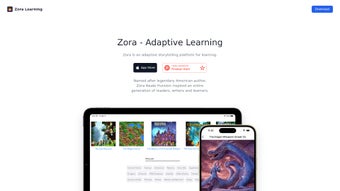

Download Zora – Adaptive AI Learning Platform for Readers
Overview & Key Benefits
Zora is an AI‑driven reading platform that reimagines the traditional worksheet by turning every text into an interactive adventure. Built for learners aged 4 to 22+, the software adapts story difficulty, vocabulary density, and narrative complexity to each user’s current skill level. By letting students design their own characters, choose plot directions, and unlock new chapters through achievements, Zora blends personalized education with the intrinsic motivation found in modern games.
The platform’s core mission is to keep curiosity at the forefront of learning, ensuring that every reading session feels fresh, purposeful, and fun. Because Zora processes data locally in the browser and never stores personal identifiers on external servers, parents and educators can trust its privacy‑first architecture. Continuous content updates mean that teachers never run out of material, and learners always encounter new challenges that match their evolving abilities.
Whether a child is mastering phonics, a teen is dissecting classic literature, or a university student is speeding through dense academic articles, Zora provides a secure, engaging, and scalable environment that grows alongside its users.
Why Zora Stands Out in the EdTech Landscape
First, the adaptive AI engine evaluates reading speed, comprehension quizzes, and lexical choices in real time, instantly adjusting the narrative to keep the learner in the optimal zone of proximal development. Second, the gamification layer rewards progress with points, badges, and leaderboards that feel like a natural extension of the story rather than an add‑on. Third, Zora’s privacy model complies with GDPR and COPPA, encrypting all session data and prohibiting any sale of personal information. Finally, the web‑based delivery eliminates the need for bulky installers, making the tool instantly accessible on Windows, macOS, Android, and iOS browsers. These combined strengths create a holistic learning ecosystem that is both pedagogically sound and technologically forward‑looking.
Features, Pros & Cons
Feature Highlights
- AI‑personalized story creation – learners choose characters, settings, and difficulty.
- Dynamic vocabulary builder that introduces new words contextually.
- Gamification engine with points, badges, and leaderboards to motivate mastery.
- Progress tracking dashboard for students, parents, and educators.
- Unlimited, age‑filtered library that expands automatically with new content.
- Secure, privacy‑first architecture – no personal data is stored or sold.
- Cross‑platform web access – works on Windows, macOS, Android, and iOS browsers.
- Teacher mode with classroom assignments and real‑time analytics.
- Multilingual support for English learners and ESL students.
- Seamless integration with popular LMS platforms via API.
Pros
- Highly personalized learning paths powered by adaptive AI.
- Engaging gamification keeps motivation high across age groups.
- Robust privacy model—no personal data stored or sold.
- Unlimited, regularly refreshed content library.
- Cross‑platform accessibility eliminates the need for device‑specific installations.
- Teacher dashboard provides actionable insights for targeted instruction.
Cons
- Requires a stable internet connection; offline mode is not yet available.
- Advanced analytics are limited to paid plans.
- Some younger learners may need initial adult guidance to navigate the UI.
Installation, Setup, Compatibility & FAQ
Zero‑Install Installation & Quick Setup
Because Zora is entirely web‑based, there is no executable file to download. Users simply need a modern browser (Chrome, Firefox, Safari, or Edge) and an internet connection. The platform auto‑optimizes for desktop, tablet, or smartphone screens, making it ideal for classroom labs, home laptops, and mobile devices alike. Follow these five steps to start reading in under three minutes:
- Visit the official site. Go to www.zora.ai and click “Get Started.”
- Create a free account. Enter a username, secure password, and optionally link a guardian email for child accounts.
- Select learning level. Answer a brief questionnaire about age, reading proficiency, and interests; Zora’s AI instantly configures the appropriate difficulty band.
- Customize your avatar. Choose a character and visual style; this optional step boosts engagement.
- Launch your first story. Browse the curated library or let Zora generate a narrative based on the profile you just created.
Operating System Compatibility
- Windows 10/11: Full support via any modern browser.
- macOS 12+: Seamless experience in Safari, Chrome, or Firefox.
- Android 8.0+: Optimized for Chrome Mobile and Firefox.
- iOS 13+: Works flawlessly in Safari and Chrome.
Updates are delivered automatically from the cloud, ensuring every session benefits from the latest AI improvements, new story packs, and security patches without user intervention. Schools with strict firewalls can whitelist the domain zora.ai to guarantee uninterrupted access.
Frequently Asked Questions
Is Zora completely free to use?
Zora offers a robust free tier that includes unlimited story access, basic progress tracking, and core gamification features. Premium subscriptions unlock teacher analytics, advanced reporting, and priority support.
How does Zora protect my child’s privacy?
Zora adheres to GDPR and COPPA standards. No personal identifiers (name, email, location) are stored on external servers, and all session data is encrypted in transit. Parents control all account settings via a guardian dashboard.
Can Zora be integrated into existing school LMS platforms?
Yes. Zora provides an API and LTI (Learning Tools Interoperability) connector that allows seamless embedding into Canvas, Moodle, Google Classroom, and other popular LMS solutions.
What age groups does Zora support?
The platform is designed for ages 4 through 22+. Content is automatically filtered to match developmental reading levels, from phonics‑focused stories for kindergarteners to complex literature analyses for college students.
Does Zora work on tablets and smartphones?
Absolutely. Zora’s responsive design adapts to any screen size, and touch‑friendly navigation ensures a smooth experience on iPads, Android tablets, and phones.
Final Verdict & Call to Action
In a market saturated with static e‑books and generic drill‑and‑practice apps, Zora distinguishes itself by turning reading into a living, adaptive story that grows with each learner. Its AI engine crafts narratives that are simultaneously challenging and relevant, while the built‑in gamification rewards progress in a way that feels natural rather than forced. For parents seeking a safe, ad‑free environment, the platform’s stringent privacy policy offers peace of mind. Educators will appreciate the teacher dashboard that translates engagement data into actionable lesson plans, and students of any age will love the freedom to shape their own adventures.
If you’re ready to replace monotonous worksheets with an interactive reading experience that sparks curiosity, download Zora today. Visit the official site, create a free account, and start exploring a world of stories that evolve with you. Schools looking for deeper insights should consider the premium plan to unlock full analytics and seamless LMS integration. Experience the future of reading—secure, personalized, and undeniably fun.



.png)



